AI Features
Set up AI and let it work in your garden for you.
Setting up AI
Bring your own key from Claude, OpenAI or Grok, or run Ollama free on your own computer. Add it once in Settings and AI works across the app.
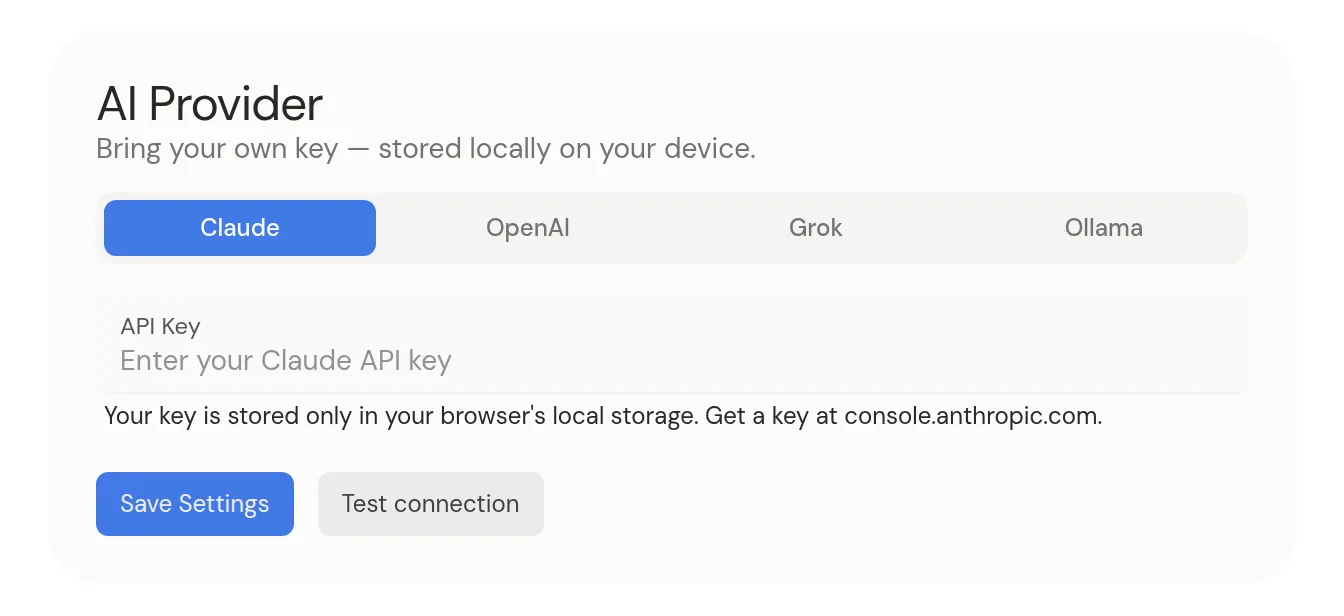
- 1Open Settings.
- 2Pick Claude, OpenAI, Grok or Ollama.
- 3Paste your API key. Ollama doesn't need one.
- 4Click Test connection, then Save Settings.
Command-K AI assistant
Open the command bar and tell the AI what you want, like “connect these two” or “add a summary to this”. It sees your whole canvas and what you've selected. Right-click anything and choose AI… to ask about just that.
Drawing pictures with AI
With Grok or OpenAI, ask the assistant to draw something and the picture lands on your canvas. Use /ai in a thought's notes to draw right into it instead.
Web search with Grok
With Grok, the assistant can search the web and X when a question needs fresh facts. It lists its sources under the reply.
AI autofill and the sparkle
Add a thought without a type and AI picks one, and may add a short description. While editing, tap the sparkle under the notes to fill in more. It only adds and never changes what you wrote.
Semantic indexing (embeddings)
Turn on Automatic embeddings in Settings to power semantic search, related ideas and clusters of similar thoughts. It needs OpenAI or a local Ollama model. Claude and Grok can't do it.
Garden intelligence
With nothing selected, click the garden's name in the panel at the bottom to open garden intelligence. Write what the garden is for in its Goal, and suggestions steer toward it. Drag the bar under the summary to make it taller or shorter.
Privacy
Your API key stays in your browser. Claude and OpenAI requests go straight from your browser to the provider, and Grok requests pass through our server without being stored. For full privacy, use Ollama.